


What is DNS Firewall and How Traffic Filtering Works. VPN vs Firewall
DNS Firewall is a network security solution that intercepts DNS resolution for known-malicious websites and protects your devices from malware infection. In simple terms, it prevents you from connecting to known malicious Internet locations and ensures that your private data remains protected.
To top it off, DNS Firewall also allows to block sites that contain annoying pop-up windows and undesirable content (like gaming, gambling, adult sites). Keep reading for more information about VPN vs Firewall!
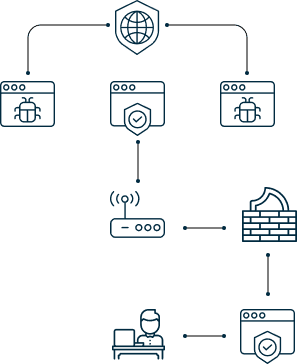
How DNS Firewall works
The first thing to figure out when exploring the VPN vs Firewall question, we should note that DNS-based malware is one of the most dangerous cyber threats that are used to steal your online identity. According to a global 2019 DNS Security survey, 91% of malware use DNS services to build their cyber attacks and 82% of survey respondents had been targeted by a DNS attack during the last year. DNS Firewall, in turn, has been created to safeguard our users from such attacks.
When the technology intercepts malicious DNS response, it directs a website with this response to a walled garden and makes such a malicious network unreachable for your device. The work of DNS Firewall can also be compared with a custom house. The customs officer is responsible for preventing the importation of illegal and/or dangerous goods into the country, and DNS Firewall is responsible for preventing the importation of malware to your device.
Benefits of DNS Firewall by KeepSolid vs VPNs

Malware blocking
Everyone agrees that prevention is better than cure. This applies to cybersecurity too! DNS Firewall is perfect for preventing malware infection. It stops malicious traffic and by blocking compromised and dangerous websites, leaving malware no chance of getting you. As we’ve said, it’s better to detect and block malicious domains than curing whatever viruses and other nasty stuff you got there.

Real-time traffic filtering
DNS Firewall by KeepSolid filters your web traffic as you’re browsing the web, without hindering you one bit. It blocks malicious domains, protects your online activities, without you even noticing it. You can select what types of websites, domains, or content you want blocked (e.g. gambling, gaming, adult sites, fake news, etc.) or even manually create custom blocklists.

Restricting phishing websites
In case you didn’t know, phishing websites attempt to steal your personal information by “phishing” it out of you, e.g. by presenting you with a fake version of a legitimate site prompting you to enter your credentials. They are often used in email-based cyberattacks. But with DNS Firewall, phishing sites don’t stand a chance! Our app preventively detects and blocks phishing links.

Intuitive and easy-to-learn
It’s super-easy to get started with DNS Firewall by KeepSolid to filter network traffic. This app offers simple yet effective interface and requires only a few steps to pick up, so DNS Firewall vs VPN is much easier. Download it on your device, select what kind of sites you want to filter, launch DNS connection, and you’re on velvet.

Protection for all devices
A single DNS Firewall subscription allows you to secure up to 5 connections simultaneously. This means that you can download files on your Windows, stream TV shows on Mac, enjoy favorite songs on iPhone with Apple Music, browse the web on Android, all the while staying safe on each and all of them! Most VPNs offer less - another win for Firewall vs VPN!

Curated and customizable
DNS Firewall by KeepSolid keeps your devices secure at all times. To ensure this, we curate blocklists of suspicious domains, malicious URLs, and phishing websites that we offer you and regularly update them. And if that’s not enough, you can customize the lists or create your own ones. Your online activities and sensitive data will stay safe and sound with DNS Firewall traffic filtering.




How to benefit from DNS Firewall
There are two ways you can benefit from DNS Firewall by KeepSolid, both described below. We recommend the first option, as its faster and more convenient. The second option is for advanced users only, as it may affect your experience with not only DNS Firewall, but also other KeepSolid’s apps. So if you don't want to have a conflict between your DNS Firewall vs VPN Unlimited apps, better use the first option!